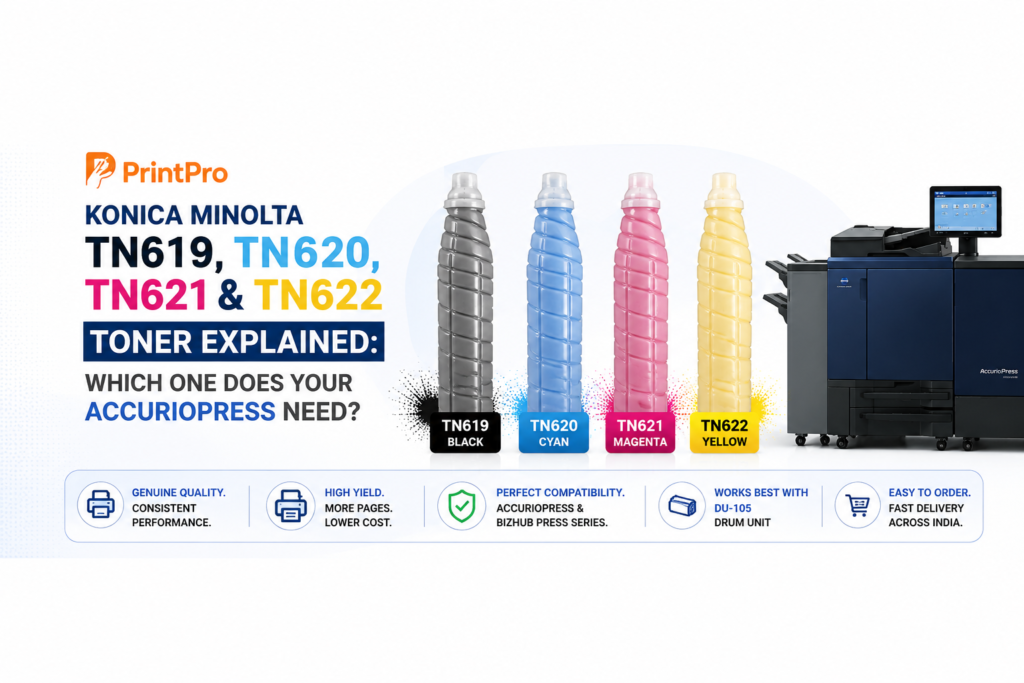
If you run a Konica Minolta production press, sooner or later you’ll be searching a five-character code — TN619, TN620, TN621 or TN622 — trying to make sure you order the right toner. Order the wrong one and you’ve wasted money and time; worse, forcing an incompatible cartridge can cause print-quality problems.
This guide clears it up once and for all. We’ll show you exactly which toner each Konica Minolta AccurioPress and bizhub Press model uses, how many prints to expect, why genuine toner protects your machine, and how to order the correct part the first time — anywhere in India.
Quick Answer: Which Konica Minolta Toner Do I Need?
| Toner | Used in (common models) | Type |
|---|---|---|
| TN619 | AccurioPress C2060, C2070, C3070, C3080, C3080P, C4065, C4070, C4080; bizhub PRESS C1060, C1070/P | Standard production colour |
| TN620 | bizhub PRO C1060L, C1070L (the “L” lite-production models) | Lite-production colour |
| TN621 | bizhub PRESS C71hc, AccurioPress C83hc (high-chroma “hc” models) | High-chroma colour |
| TN622 | AccurioPress C6085, C6100, C1085, C1100; bizhub PRESS C6085/C6100 | High-end production colour |
All four are sold as four separate colour cartridges — Black (K), Cyan (C), Magenta (M) and Yellow (Y) — which you can buy individually or as a full CMYK set.
Golden rule: the toner code is tied to your exact model. When in doubt, check the machine’s model name and serial number before ordering — or send them to us and we’ll confirm the correct part.
TN619 — The Most Common AccurioPress Toner
If you run an AccurioPress C2060, C2070, C3070, C3080, C4065 or C4070, TN619 is almost certainly your toner. It’s the workhorse cartridge for Konica Minolta’s mainstream colour production range and the most-searched of the four.
Compatible models: AccurioPress C2060, C2070, C3070, C3080, C3080P, C4065, C4070, C4080 and bizhub PRESS C1060, C1070/C1070P.
Colours and part numbers: TN619K (Black), TN619C (Cyan), TN619M (Magenta), TN619Y (Yellow).
Expected yield: roughly 66,000 prints for black and around 70,000 prints per colour cartridge at 5% A4 coverage. Real-world yield depends on how much ink your jobs lay down — heavy graphics use far more than text.
Toner technology: TN619 uses Konica Minolta’s Simitri HDE polymerised toner, formulated for a wide colour gamut, smooth halftones and lower fusing temperature — which is part of why these presses produce such clean, photo-grade colour.
TN620 — For the bizhub PRO “L” Lite-Production Models
TN620 is frequently confused with TN619 because the toner chemistry is closely related. The key difference is the machine: TN620 is designed for the bizhub PRO C1060L and C1070L lite-production presses.
Even though the powder is similar, the cartridge (bottle) is different, so an OEM TN620 will not simply drop into a standard AccurioPress, and vice-versa. Always match the toner to your specific model — don’t assume “close enough” will work.
TN621 — For High-Chroma (hc) Presses
TN621 serves the high-chroma machines: the bizhub PRESS C71hc and AccurioPress C83hc. These “hc” presses are built for especially vivid, saturated colour, and they use this dedicated toner to achieve it. If your machine name ends in hc, TN621 is what you need — not TN619.
TN622 — For High-End Production (C6085 / C6100 / C1085 / C1100)
TN622 is the toner for Konica Minolta’s higher-end, heavier-duty production presses: the AccurioPress C6085 and C6100, and the bizhub PRESS C1085, C1100, C6085 and C6100. If you’re running one of these larger machines, look for TN622 — not the TN619 used by the smaller C-series.
How to Tell It’s Time to Replace Your Toner
Your AccurioPress will warn you well before it runs dry, but watch for these signs:
- On-screen low-toner / replace-toner messages with the affected colour.
- Fading or weak density in one colour channel.
- Colour casts — prints drifting warm or cool because one colour is depleting.
- Streaking or patchiness in solid areas.
Keeping a spare set on the shelf is smart for any busy shop — a toner-out mid-run on a deadline job is exactly the kind of avoidable downtime that costs you money.
Genuine vs “Compatible” Toner — Why It Really Matters
You’ll find plenty of cheap “compatible” toner online. On a production press, that saving can cost you far more than it saves. Here’s why genuine Konica Minolta toner is worth it:
- It protects the engine. Genuine toner is formulated to work with your machine’s developer and drum units. Cheap toner can accelerate developer contamination and drum wear — and those parts cost far more than the toner you “saved” on.
- It prevents defects. Off-spec toner is a common cause of backgrounding (background toner), streaking and inconsistent colour.
- It holds colour. For photo, wedding-album and marketing work, predictable, accurate colour across long runs is the whole point.
- It keeps yields honest. Genuine cartridges deliver their rated page counts; many cheap ones quietly under-deliver.
For a business that sells prints, genuine consumables aren’t an expense — they’re cheap insurance for your machine and your reputation.
Don’t Forget the Developer and Drum Units
Toner is only one part of the imaging system. To keep output clean, these production presses also rely on developer units and drum (imaging) units — for example, the DU-105 drum unit used on the C3070-class machines is rated for around 410,000 pages. When you notice persistent marks, ghosting or density issues that fresh toner doesn’t fix, the developer or drum is often the real culprit.
Stocking the right consumables together — toner, developer and drums for your model — is the simplest way to avoid surprise downtime.
How to Store and Handle Toner
- Keep cartridges sealed, upright and in a cool, dry place, away from direct sunlight.
- Don’t stockpile beyond the shelf life (genuine toner typically stores well for a year or two when kept properly).
- Only shake / install as per the machine’s prompt — and load the correct colour slot.
How to Order the Correct Toner (First Time, Every Time)
The fastest way to avoid a wrong order:
- Note your exact model name (e.g. AccurioPress C3070) and serial number.
- Note the colour(s) you need and quantity.
- Send those to a Konica Minolta specialist who can confirm the exact part number and availability.
That’s exactly what we do for print shops every day — match genuine toner, developer and drums to your machine, and get them to you fast.
Frequently Asked Questions
Is TN619 the same as TN620? The toner chemistry is closely related, but the cartridges and target machines differ — TN619 is for the standard AccurioPress C-series, TN620 is for the bizhub PRO C1060L/C1070L lite models. Use the part that matches your exact machine.
Which toner does the AccurioPress C3070 use? TN619 (TN619K/C/M/Y). The C2060, C2070, C3080, C4065 and C4070 use the same TN619 family.
How many prints does one TN619 cartridge give? Roughly 66,000 prints for black and about 70,000 per colour at 5% A4 coverage — actual yield depends on how heavy your coverage is.
What’s the difference between TN621 and TN619? TN621 is for high-chroma (hc) presses like the bizhub Press C71hc and AccurioPress C83hc, which produce more saturated colour. TN619 is for the standard C-series.
Should I use genuine or compatible toner? For a production press, genuine. It protects your developer and drum units, prevents print defects, and delivers honest yields — usually cheaper in the long run.
Can you supply these toners in Mumbai and across India? Yes. We supply genuine Konica Minolta toner, developer and drum units across Mumbai, Thane, Navi Mumbai, Pune and Gujarat, with a growing pan-India network.
Order the Right Konica Minolta Toner — Fast
Stop guessing part numbers. Send us your machine model and serial number, tell us the colours you need, and we’ll confirm the correct genuine toner (plus developer and drum units if you’re due) and get them to you quickly.
Call +91 91737 65590, WhatsApp us, or send an enquiry — and keep your AccurioPress producing clean, consistent colour.
Facing this on your machine?
Send your model and the issue - our Konica Minolta experts will help you sort it out.